
Rules Engine
Create, schedule and execute automation rules in Magistrala using Lua or Go scripts to process and forward real-time IoT data.
The Rules Engine in Magistrala provides powerful, flexible message processing via scriptable rules. Each rule can consume real-time input, run on a schedule, and forward results to multiple output targets including channels, alarms, emails, databases, and more.
Key Features
- Scriptable logic - Use Lua or Go to define message execution behavior.
- Flexible execution - Rules can be triggered from input messages, schedules or both.
- Pluggable outputs - Built-in support for alarms, channels, email, Postgres, and SenML/JSON internal-DB writers.
- Secure, scoped execution - Using workspace-level isolation and bearer token authorization. See Authorization for details on the roles and permission model.
- Disabled rules - Rules can be disabled individually to prevent further executions. They can also be enabled to re-start their executions.
Architecture
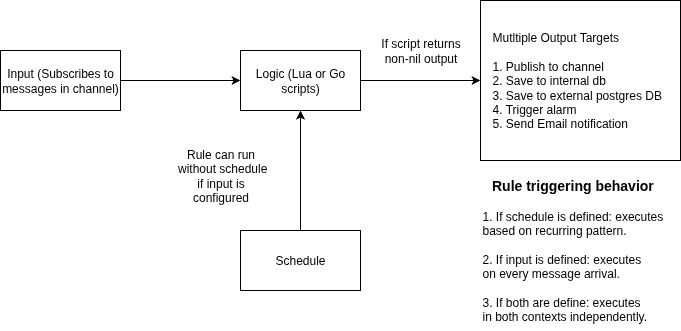
The Magistrala Rules Engine is designed for real-time and scheduled message processing. Its architecture revolves around applying custom business logic to incoming messages or scheduled triggers and forwarding results to one or more output targets.
Data Flow Summary
-
Input The engine subscribes to a channel (and optionally a topic) to receive messages from devices, services, or pipelines in real time.
If no schedule is defined, the rule executes every time a new message arrives on the configured channel/topic.
-
Schedule If a schedule is defined, the rule will automatically execute based on the configured:
- Start time
- Execution time
- Recurrence (daily, weekly, monthly)
- Recurring Interval (e.g 1,2,3 etc) - For example if recurrence is daily and interval is 2, it will repeat every 2 days.
- Logic The incoming message or scheduled execution is processed using a user-defined script, written in:
- Lua
- Go
The logic must return a non-nil value for outputs to be invoked.
- Output(s) If the script returns a value, the rules forwards the result to one or more outputs. Supported output types include:
- Channel - Forward the result to another channel and/or topic.
- Internal DB - Save processed data internally.
- Postgres DB - Store result in a connected Postgres database table.
- Alarm - Raise and alarm event with a severity level.
- Email - Send notifications to configured recipients.
- Slack - Send notifications to configured slack channel.
Note: Access to each operation is governed by workspace-level roles. Refer to Authorization for details on which permissions are required.
Broker Acknowledgment and Delivery
Rules Engine acknowledgment timing is configurable independently of rule execution success. This lets operators favor asynchronous consumption or wait for rule completion without necessarily retrying poison messages.
| Variable | Values | Default | Description |
|---|---|---|---|
MG_RE_ACK_MODE | before, after | before | Selects whether the broker can acknowledge before execution or must wait for every matched rule. |
MG_RE_ACK_ON_EXECUTION_ERROR | true, false | true | In after mode, acknowledges execution errors when true; NACKs them for redelivery when false. Ignored in before mode. |
With MG_RE_ACK_MODE=before, the service validates the message, selects matching enabled rules, dispatches their executions concurrently, and returns to the broker without waiting for scripts or outputs. Script and output failures are logged but cannot trigger redelivery. This is the default and keeps slow rules or external outputs off the consumer callback's critical path.
With MG_RE_ACK_MODE=after, matching rules still execute concurrently, but the service waits for all of them before returning a broker disposition:
MG_RE_ACK_ON_EXECUTION_ERROR=truereports script or output failures and acknowledges the message, preventing a failing rule from clogging the stream.MG_RE_ACK_ON_EXECUTION_ERROR=falseNACKs the message when any matched rule fails and requests redelivery.
Redelivery reruns every matching rule, including rules that succeeded on the previous attempt. Configure rule outputs to be idempotent before enabling NACK-on-execution-error behavior. Repository and rule-selection failures occur before execution and remain retryable in either acknowledgment mode. Any MG_RE_ACK_MODE value other than before or after causes Rules Engine startup to fail.
Core Concepts
Rules define the logic for processing messages. Each rule may specify:
- An input channel and topic to subscribe to (optional if the rule is scheduled).
- A processing script written in Lua or Go.
- A list of outputs that define where to send or store the results.
- An optional schedule to control when the rule is executed.
- A rule must have at least one of
inputorscheduleto be executed.
Rule Structure
type Rule struct {
  ID           string            `json:"id"`
  Name         string            `json:"name"`
  WorkspaceID  string            `json:"workspace"`
  Metadata     Metadata          `json:"metadata,omitempty"`
  Tags         []string          `json:"tags,omitempty"`
  InputChannel string            `json:"input_channel"`
  InputTopic   string            `json:"input_topic"`
  Logic        Script            `json:"logic"`
  Outputs      Outputs           `json:"outputs,omitempty"`
  Schedule     schedule.Schedule `json:"schedule,omitempty"`
  Status       Status            `json:"status"`
  CreatedAt    time.Time         `json:"created_at"`
  CreatedBy    string            `json:"created_by"`
  UpdatedAt    time.Time         `json:"updated_at"`
  UpdatedBy    string            `json:"updated_by"`
}| Property | Description | Required |
|---|---|---|
id | Unique identifier for the rule. | Auto-generated |
name | Descriptive name of the rule. | ✅ |
workspace | Workspace ID associated with the rule. | ✅ |
tags | Optional list of tags for categorization | Optional |
input_channel | Channel to listen for incoming messages | ✅ |
input_topic | Topic within the input channel. | Optional |
logic | Script (Lua or Go) defining message processing. | ✅ |
outputs | List of outputs to send results to. | ✅ |
schedule | Scheduling configuration | Optional |
status | Rule state (enabled or disabled or deleted) | ✅ |
created_at | Timestamp when the rule was created. | Auto-generated |
updated_at | Timestamp when the rule was last updated. | Auto-generated |
metadata | Additional rule metadata | Optional |
Note: A rule must have either an
input_channelor ascheduleor both. Ifinput_channelis omitted, the rule only executes on schedule.
Scheduling Rules
type Schedule struct {
  StartDateTime   time.Time `json:"start_datetime,omitempty"`
  Time            time.Time `json:"time,omitempty"`
  Recurring       Recurring `json:"recurring,omitempty"`
  RecurringPeriod uint      `json:"recurring_period,omitempty"`
}| Property | Description |
|---|---|
| start_datetime | When the rule becomes active. |
| time | Time of day the rule is scheduled to run |
| recurring | Recurrence pattern (None, Daily, Weekly, Monthly) |
| recurring_period | Interval multiplier (e.g. 2 = every second interval) |
Recurring Patterns Explained:
- Daily: Runs every day at the specified time.
- Weekly: Runs on the same day of the week.
- Monthly: Runs on the same day each month.
Scheduling Behavior
- If schedule is present and input_channel is not set, the rule runs at scheduled intervals.
- If both are present, the rule can execute based on incoming messages and on schedule.
Recurring Patterns Explained:
- Daily: Runs every day at the specified time.
- Weekly: Runs on the same day of the week.
- Monthly: Runs on the same day each month.
How Scheduling Works
-
Initialization:
- The scheduler starts when the service begins running via
StartScheduler() - It uses a ticker to check for rules that need to be executed at regular intervals
- The scheduler starts when the service begins running via
-
Rule Evaluation:
- For each tick, the scheduler:
- Gets all enabled rules scheduled before the current time
- For each rule, checks if it should run using
shouldRunRule() - If a rule should run, processes it asynchronously
- For each tick, the scheduler:
-
Execution Timing: The
shouldRunRule()function determines if a rule should run by checking:- If the rule's start time has been reached
- If the current time matches the scheduled execution time
- For recurring rules:
- Daily: Checks if the correct number of days have passed since start
- Weekly: Checks if the correct number of weeks have passed since start
- Monthly: Checks if the correct number of months have passed since start
-
Recurring Patterns:
None: Rule runs once at the specified timeDaily: Rule runs every N days where N is the RecurringPeriodWeekly: Rule runs every N weeksMonthly: Rule runs every N months
For example, to run a rule:
- Every day at 9 AM: Set recurring to "daily" with recurring_period = 1
- Every other week: Set recurring to "weekly" with recurring_period = 2
- Monthly on the 1st: Set recurring to "monthly" with recurring_period = 1
Rule Logic
Scripts define the logic to process messages. Two scripting types are supported:
| Type | Language | Key Info |
|---|---|---|
| 0 | Lua | Lightweight and flexible scripting language |
| 1 | Go | Scripts compiled and executed using Go plugins |
Lua Example:
function logicFunction()
  local converted_temp = (message.payload.v * 1.8 + 32)
  return {n = "Temp_fahrenheit", v = converted_temp, u = "°F"}
end
return logicFunction()
Go Example:
package main
import (
    m "messaging"
)
func logicFunction() any {
    return m.message.Payload
}
The script should return a value if it triggers an action. Otherwise, it should return nil.
Supported Message Formats
The Rules Engine supports multiple message formats. When storing messages to the internal database, you choose the output that matches your payload: the save_senml output requires the payload to be a valid SenML message (see below), while the save_json output accepts any JSON-marshalable value with no format validation.
Valid SenML Example:
[
  { "bn": "building1/", "n": "temperature", "u": "Cel", "v": 23.5 },
  { "n": "status", "vs": "OK" }
]
Constraints
- Each entry must have a unique
n - Only one value field (
v,vs,vb,vd) per entry bn,u, andtare optional
Invalid Example (duplicate n and multiple values)
[
  {
    "n": "temperature",
    "v": 23.5,
    "n": "status",
    "vs": "OK"
  }
]
Invalid Example (more than one value field)
[
  {
    "n": "status",
    "v": 1,
    "vs": "OK"
  }
]
Special Characters in n
Avoid using special characters in the n (name) field, such as:
- Slashes (
/) - Emojis
- Symbols like
@,#,:
These may break internal parsing or rule pattern matching.
Output Handling
The outputs field allows a rule to define multiple destinations or actions for its result. Supported output types include:
- channels: Publishes the result to a specific channel/topic.
- save_senml: Stores messages in Magistrala’s internal database as SenML.
- save_json: Stores messages in Magistrala’s internal database as raw JSON, with no SenML validation.
- save_remote_pg: Forwards the result to an external PostgreSQL database.
- alarms: Triggers an alarm with a structured severity report.
- email: Sends a notification email.
- Slack: Sends a slack notification.
channels
type ChannelPublisher struct {
  Type    string  `json:"type"`
  Channel string  `json:"channel"`
  Topic   string  `json:"topic"`
}
save_senml
type SenML struct {
  Type    string  `json:"type"`
}
save_json
type JSON struct {
  Type    string  `json:"type"`
}
Unlike save_senml, this output does not validate the logic's result as SenML - any JSON-marshalable value is stored as-is. The message's stored subtopic is suffixed with json so it lands in a table by that name, matching what a Message View in JSON format queries for. It requires a JSON-capable writer to be deployed - see Running SenML and JSON Writers Together.
save_remote_pg
type Postgres struct {
  Type    string  `json:"type"`
  Host     string `json:"host"`
  Port     int    `json:"port"`
  User     string `json:"user"`
  Password string `json:"password"`
  Database string `json:"database"`
  Table    string `json:"table"`
  Mapping  string `json:"mapping"`
}
alarms
type Alarms struct {
  Type    string  `json:"type"`
  RuleID  string  `json:"rule_id"`
}type Email struct {
Type string `json:"type"`
To []string `json:"to"`
Subject string `json:"subject"`
Content string `json:"content"`
}slack
type Slack struct {
	Token     string `json:"token"`
	ChannelID string `json:"channel_id"`
	Message   string `json:"message"`
}
Each output type expects a different data structure depending on its destination. For example, if your output is save_senml, it expects the result of the logic to be a valid SenML message; if your output is save_json instead, any JSON-marshalable result is accepted. e.g.
function logicFunction()
  return {
    n = message.payload.sensor,
    v = message.payload.temperature,
    u = message.payload.unit
  }
end
return logicFunction()
If the output is an alarm, it expects the result of the logic to be a valid alarm object. e.g.
function logicFunction()
    local results = {}
    local threshold = 20000

    for _, msg in ipairs(message.payload) do
        local value = msg.v
        local severity
        local cause

        if value >= threshold * 1.5 then
            severity = 5
            cause = "Critical level exceeded"
        elseif value >= threshold * 1.2 then
            severity = 4
            cause = "High level detected"
        elseif value >= threshold then
            severity = 3
            cause = "Threshold reached"
        end

        table.insert(results, {
            measurement = msg.n,
            value = tostring(value),
            threshold = tostring(threshold),
            cause = cause,
            unit = msg.unit,
            severity = severity
        })
    end

    return results
end
return logicFunction()
Topic Rewriting and . Operator
MQTT topics received by Magistrala are rewritten into dot-separated strings for Rules Engine processing. For example:
Topic:
m/<workspace_id>/c/<channel_id>/building1/floor2/tempBecomes:
channels.<channel_id>.building1.floor2.tempThis means:
- MQTT
/separators are rewritten as.internally - Rules matching
input_topicor usingmessage.subtopicmust use dot-separated format - Every empty segment (e.g. double slashes
//) is removed
Rule Status
Rules can have one of the following statuses:
- Enabled: The rule is active and processes incoming messages.
- Disabled: The rule is inactive and does not process messages.
- Deleted - The rule is marked for deletion
API Operations
The Rules Engine API exposes several endpoints for managing rules. All requests require a valid JWT Bearer Token for authentication.
The Base URL:
http://localhost:9008
The Rules Engine service provides the following operations:
create_rule- Create a new rulelist_rules- Query rules with filtering optionsview_rule- Retrieve a specific ruleupdate_rule- Modify an existing ruleupdate_rule_tags- Modify tagsupdate_rule_scheduler- Update rule scheduledelete_rule- Delete a ruleenable_rule- Activate a ruledisable_rule- Deactivate a rule
Create Rule
Endpoint: POST /{workspaceID}/rules
Example command:
curl --location 'http://localhost:9008/<your_workspace_id>/rules' \
--header 'Content-Type: application/json' \
--header 'Authorization: Bearer <your_access_token>' \
--data '{
  "name": "High Temperature Alert",
  "input_channel": "<your_channel_id>",
  "input_topic": "temperature",
  "logic": {
    "type": 0,
    "value": "function logicFunction() return message.payload end return logicFunction()"
  },
  "outputs": [
    {
      "type": "save_senml"
    }
  ],
  "schedule": {
    "start_datetime": "2025-07-29T09:00:00Z", // must be greater than the current date-time
    "time": "2025-07-29T11:00:00Z",
    "recurring": "daily",
    "recurring_period": 1
  }
}'{
"id": "d4b5c393-70fc-4399-829c-070df5205698",
"name": "High Temperature Alert",
"workspace": "3bf0d3e6-5383-4838-96a7-52c18da0aca0",
"input_channel": "3214f360-cebd-449b-bc3c-9020a3be403a",
"input_topic": "temperature",
"logic": {
"type": 0,
"value": "function logicFunction() return message.payload end return logicFunction()"
},
"outputs": [{ "type": "save_senml" }],
"schedule": {
"start_datetime": "2025-07-29T04:52:21Z",
"time": "2025-07-29T04:52:21Z",
"recurring": "daily",
"recurring_period": 1
},
"status": "enabled",
"created_at": "2025-07-29T04:52:21.358252Z",
"created_by": "ae03cf7d-f2e8-49ac-ab28-17481635322a",
"updated_at": "0001-01-01T00:00:00Z",
"updated_by": ""
}View Rule
Enpoint: Get /{workspaceID}/rules/{rule_id}
Example command:
curl --location 'http://localhost:9008/<your_workspace_id>/rules/<your_rule_id>' \
--header 'Authorization: Bearer <your_access_token>'{
"id": "d4b5c393-70fc-4399-829c-070df5205698",
"name": "High Temperature Alert",
"workspace": "3bf0d3e6-5383-4838-96a7-52c18da0aca0",
"input_channel": "3214f360-cebd-449b-bc3c-9020a3be403a",
"input_topic": "temperature",
"logic": {
"type": 0,
"value": "function logicFunction() return message.payload end return logicFunction()"
},
"outputs": [{ "type": "save_senml" }],
"schedule": {
"start_datetime": "2025-07-29T04:52:21Z",
"time": "2025-07-30T04:52:21Z",
"recurring": "daily",
"recurring_period": 1
},
"status": "enabled",
"created_at": "2025-07-29T04:52:21.358252Z",
"created_by": "ae03cf7d-f2e8-49ac-ab28-17481635322a",
"updated_at": "2025-07-29T04:52:45.844481Z",
"updated_by": ""
}List Rules
Endpoint: GET /{workspaceID}/rules
Query Parameters:
offset: Pagination offsetlimit: Maximum number of resultsinput_channel: Filter by input channelstatus: Filter by rule status
Example command:
curl --location 'http://localhost:9008/<your_workspace_id>/rules?input_channel=<your_channel_id>&status=enabled' \
--header 'Authorization: Bearer <your_access_token>'{
"offset": 0,
"limit": 10,
"total": 1,
"rules": [
{
  "id": "d4b5c393-70fc-4399-829c-070df5205698",
  "name": "High Temperature Alert",
  "workspace": "3bf0d3e6-5383-4838-96a7-52c18da0aca0",
  "input_channel": "3214f360-cebd-449b-bc3c-9020a3be403a",
  "input_topic": "temperature",
  "logic": {
    "type": 0,
    "value": "function logicFunction() return message.payload end return logicFunction()"
  },
  "outputs": [{ "type": "save_senml" }],
  "schedule": {
    "start_datetime": "2025-07-29T04:52:21Z",
    "time": "2025-07-30T04:52:21Z",
    "recurring": "daily",
    "recurring_period": 1
  },
  "status": "enabled",
  "created_at": "2025-07-29T04:52:21.358252Z",
  "created_by": "ae03cf7d-f2e8-49ac-ab28-17481635322a",
  "updated_at": "2025-07-29T04:52:45.844481Z",
  "updated_by": ""
}
]
}Update Rule
Endpoint: PATCH /{workspaceID}/rules/{rule_id}
Example command:
curl --location --request PATCH 'http://localhost:9008/<your_workspace_id>/rules/<your_rule_id>' \
--header 'Content-Type: application/json' \
--header 'Authorization: Bearer <your_access_token>' \
--data '{
  "name": "High Temp Alert Updated"
}'{
"id": "d4b5c393-70fc-4399-829c-070df5205698",
"name": "High Temp Alert Updated",
"workspace": "3bf0d3e6-5383-4838-96a7-52c18da0aca0",
"input_channel": "",
"input_topic": "",
"logic": {
"type": 0,
"value": "function logicFunction() return message.payload end return logicFunction()"
},
"outputs": [{ "type": "save_senml" }],
"schedule": {
"start_datetime": "2025-07-29T04:52:21Z",
"time": "2025-07-30T04:52:21Z",
"recurring": "daily",
"recurring_period": 1
},
"status": "enabled",
"created_at": "2025-07-29T04:52:21.358252Z",
"created_by": "ae03cf7d-f2e8-49ac-ab28-17481635322a",
"updated_at": "2025-07-29T05:07:49.681315Z",
"updated_by": "ae03cf7d-f2e8-49ac-ab28-17481635322a"
}Update Rule Tags
Endpoint: PATCH /{workspaceID}/rules/{rule_id}/tags
Example command:
curl --location --request PATCH 'http://localhost:9008/<your_workspace_id>/rules/<your_rule_id>/tags' \
--header 'Content-Type: application/json' \
--header 'Authorization: Bearer <your_access_token>' \
--data '{
  "tags": ["tag1","tag2"]
}'{
"id": "d4b5c393-70fc-4399-829c-070df5205698",
"name": "High Temp Alert Updated",
"workspace": "3bf0d3e6-5383-4838-96a7-52c18da0aca0",
"tags": ["tag1", "tag2"],
"input_channel": "",
"input_topic": "",
"logic": {
"type": 0,
"value": "function logicFunction() return message.payload end return logicFunction()"
},
"outputs": [{ "type": "save_senml" }],
"schedule": {
"start_datetime": "2025-07-29T04:52:21Z",
"time": "2025-07-30T04:52:21Z",
"recurring": "daily",
"recurring_period": 1
},
"status": "enabled",
"created_at": "2025-07-29T04:52:21.358252Z",
"created_by": "ae03cf7d-f2e8-49ac-ab28-17481635322a",
"updated_at": "2025-07-29T05:10:54.991749Z",
"updated_by": "ae03cf7d-f2e8-49ac-ab28-17481635322a"
}Update Rule Scheduler
Endpoint: PATCH /{workspaceID}/rules/{rule_id}/schedule
Example command:
curl --location --request PATCH 'http://localhost:9008/<your_workspace_id>/rules/<your_rule_id>/schedule' \
--header 'Content-Type: application/json' \
--header 'Authorization: Bearer <your_access_token>' \
--data '{
    "schedule": {
    "start_datetime": "2025-07-29T10:52:21Z",
    "time": "2025-07-30T04:52:21Z",
    "recurring": "weekly",
    "recurring_period": 2
  }
}'{
"id": "d4b5c393-70fc-4399-829c-070df5205698",
"name": "High Temp Alert Updated",
"workspace": "3bf0d3e6-5383-4838-96a7-52c18da0aca0",
"tags": ["tag1", "tag2"],
"input_channel": "",
"input_topic": "",
"logic": {
"type": 0,
"value": "function logicFunction() return message.payload end return logicFunction()"
},
"outputs": [{ "type": "save_senml" }],
"schedule": {
"start_datetime": "2025-07-29T10:52:21Z",
"time": "2025-07-30T04:52:21Z",
"recurring": "weekly",
"recurring_period": 2
},
"status": "enabled",
"created_at": "2025-07-29T04:52:21.358252Z",
"created_by": "ae03cf7d-f2e8-49ac-ab28-17481635322a",
"updated_at": "2025-07-29T05:13:05.877133Z",
"updated_by": "ae03cf7d-f2e8-49ac-ab28-17481635322a"
}Disable Rule
Endpoint: POST /{workspaceID}/rules/{rule_id}/disable
Example Command:
curl --location --request POST 'http://localhost:9008/<your_workspace_id>/rules/<your_rule_id>/disable' \
--header 'Authorization: Bearer <your_access_token>' \{
"id": "d4b5c393-70fc-4399-829c-070df5205698",
"name": "High Temp Alert Updated",
"workspace": "3bf0d3e6-5383-4838-96a7-52c18da0aca0",
"tags": ["tag1", "tag2"],
"input_channel": "",
"input_topic": "",
"logic": {
"type": 0,
"value": "function logicFunction() return message.payload end return logicFunction()"
},
"outputs": [{ "type": "save_senml" }],
"schedule": {
"start_datetime": "2025-07-29T10:52:21Z",
"time": "2025-07-30T04:52:21Z",
"recurring": "weekly",
"recurring_period": 2
},
"status": "disabled",
"created_at": "2025-07-29T04:52:21.358252Z",
"created_by": "ae03cf7d-f2e8-49ac-ab28-17481635322a",
"updated_at": "2025-07-29T05:16:36.254008Z",
"updated_by": "ae03cf7d-f2e8-49ac-ab28-17481635322a"
}Responses:
| Status Code | Description |
|---|---|
200 | Rule disabled successfully. |
400 | Invalid rule ID. |
401 | Unauthorized access. |
404 | Rule not found. |
500 | Internal server error. |
Enable Rule
Endpoint: POST /{workspaceID}/rules/{rule_id}/enable
The API endpoint follows the format: http://localhost:9008/{workspaceID}/rules/{ruleID}/enable
curl --location --request POST 'http://localhost:9008/<your_workspace_id>/rules/<your_rule_id>/enable' \
--header 'Authorization: Bearer <your_access_token>' \{
"id": "d4b5c393-70fc-4399-829c-070df5205698",
"name": "High Temp Alert Updated",
"workspace": "3bf0d3e6-5383-4838-96a7-52c18da0aca0",
"tags": ["tag1", "tag2"],
"input_channel": "",
"input_topic": "",
"logic": {
"type": 0,
"value": "function logicFunction() return message.payload end return logicFunction()"
},
"outputs": [{ "type": "save_senml" }],
"schedule": {
"start_datetime": "2025-07-29T10:52:21Z",
"time": "2025-07-30T04:52:21Z",
"recurring": "weekly",
"recurring_period": 2
},
"status": "enabled",
"created_at": "2025-07-29T04:52:21.358252Z",
"created_by": "ae03cf7d-f2e8-49ac-ab28-17481635322a",
"updated_at": "2025-07-29T05:17:12.534919Z",
"updated_by": "ae03cf7d-f2e8-49ac-ab28-17481635322a"
}Responses:
| Status Code | Description |
|---|---|
200 | Rule enabled successfully. |
400 | Invalid rule ID. |
401 | Unauthorized access. |
404 | Rule not found. |
500 | Internal server error. |
Delete Rule
Endpoint: DELETE /{workspaceID}/rules/{rule_id}
Example Command:
curl --location --request DELETE 'http://localhost:9008/<your_workspace_id>/rules/<your_rule_id>' \
--header 'Authorization: Bearer <your_access_token>' \
Responses:
| Status Code | Description |
|---|---|
204 | Rule deleted. |
400 | Invalid rule ID. |
401 | Unauthorized access. |
404 | Rule not found. |
500 | Internal server error. |
Error Codes
| HTTP Code | Description |
|---|---|
400 | Invalid request or parameters. |
401 | Unauthorized: Missing/invalid token. |
403 | Forbidden: Access denied. |
404 | Resource not found. |
415 | Unsupported content type. |
500 | Internal server error. |
🌟 Best Practices
- Use Descriptive Names – Choose names that clearly convey the rule's purpose.
- Validate Your Scripts – Whether Lua or Go, ensure the script returns the correct output format.
- Regularly Monitor Rules – Periodically review rule execution logs.
- Schedule Thoughtfully – Avoid overlapping rule executions unless necessary.
- Keep Output Aligned – Match your logic output format to the selected output type (e.g., alarm, database, publish).
- Test New Rules – Test rules in a controlled environment before deployment.
Reports
Generate, schedule and export IoT data reports in Magistrala as PDF or CSV with timezone and email support.
API
Magistrala API reference for users, workspaces, devices, channels, groups, and messages — Atom's GraphQL API plus the still-current HTTP/MQTT/CoAP/WS message publishing endpoints, with sample requests.